You can find firmware files for your NR300 device on this page. Use the table below or the changelog to find the right download.
Latest Firmware
This release includes our newest features and fixes. It has been fully tested via our internal QA process and real-world deployments to ensure all known issues are resolved. This is our recommended stable version, currently used as the default for mass production.
Identification of Network Security Firmware
To distinguish whether a device is running Network Security Firmware (hereinafter referred to as "Secure Firmware"), please refer to the following criteria. Secure Firmware is defined as firmware that fully satisfies the requirements of standards EN 18031-1 and EN 18031-2.
1. Identification Methods
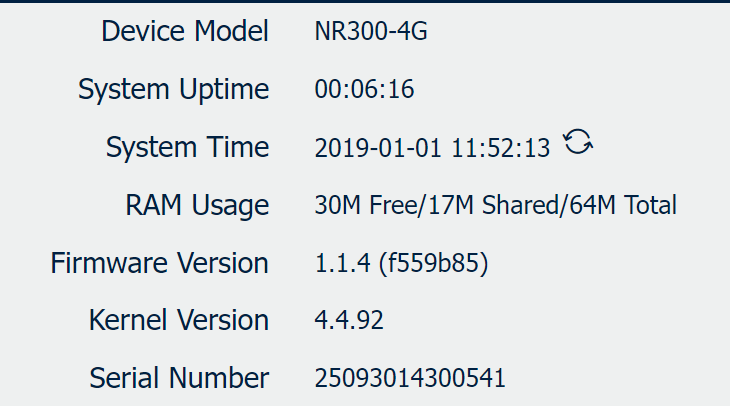
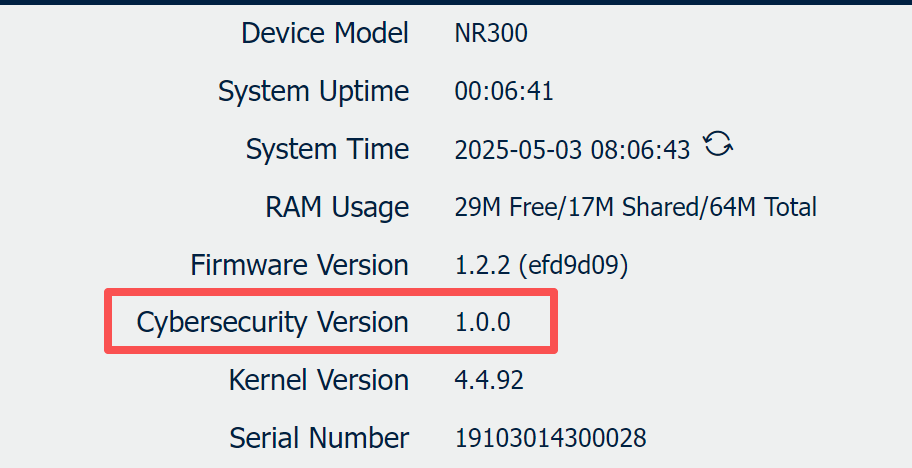
You can verify if the current device is operating on Secure Firmware through the following indicators:
| Standard Firmware | Secure Firmware |
 |
|
2. Critical Upgrade Policy
Please be aware of the strict version control policy regarding Secure Firmware:
⚠️Important: The upgrade path from Standard Firmware to Network Security Firmware is permanent and irreversible.
- No Downgrade Allowed: Once a device has been upgraded from a standard version to a Network Security Firmware version, downgrading back to a standard (non-compliant) firmware version is strictly prohibited.
- System Protection: The system bootloader will reject any attempt to flash an older, non-compliant firmware image to ensure the device maintains its security certification status.
Latest Secure Firmware for NR300
Applicapable for NR300
| File | Release Date | Size | Display on GUI |
| NR300 Secure Firmware V1.2.2 | 2025/11/20 | 8.4MB | v1.2.2(efd9d09 |
Changelog
New Features
1. Add a downgrade prevention function. Not allow to downgrade to firmware versions prior to v1.2.2(efd9d09).
2. Compatible with Quectel EC200A-EU Module Firmware that supported RED-DA certification.
3. Compatible with Neoway N723 Module Firmware that supported RED-DA certification.
Improved Features
1. Fix the issue where the router cannot use the LAN port IP as the source address to access the external internet.
2. Fix the issue where link management reconnect fails after cellular over-limit occurs.
3. Fix the issue where the DHCP service malfunctions when the default policy of the firewall is set to DROP.
4. The basic encryption algorithms of the firmware are changed.
5. The encryption algorithms of the below APPs are changed.
6. Fix the issue where the SSH login protection function does not clear the failure count after a successful login.
| APP | Version | Compatible Firmware |
| DLMS master | v1.1.1(a77e96c) | V1.2.0 or newer |
| DLMS to IEC104 | v1.1.1(a77e96c) | V1.2.0 or newer |
| Modbus Master | v1.1.1(a77e96c) | V1.2.0 or newer |
|
FTP Transfer |
v1.1.1(a77e96c) |
V1.2.0 or newer |
Latest Standard Firmware for NR300
Applicapable for NR300
| File | Release Date | Size | Display on GUI |
| NR300 Standard Firmware V1.1.4 | 2024/02/01 | 7.8MB | V1.1.4(f559b85) |
Changelog
New Features
1.Add the MTU option on Connection Manager
2.Allow to set multiple time points to reboot on the Schedule Reboot feature
3.Allow to set time interval to reboot on the Schedule Reboot feature
4.Allow to set maximum 6 connections on serial port
5.When as TCP Server on serial port, allow to set maximum 3 ports.
6.Allow to set Reconnect Interval and Reconnect times on serial port
7.Allow to display RSRP, RSRQ, SINR, BAND and ICCID on cellular page
8.Add CSRF/XSS security policy on Web Server
9.Add GRE and ESP protocols on Firewall ACL
10.Add NAT feature on LAN interface
11.Add Enable Verbose Log on SMS feature
12.Add capture Direction on Sniffer Tool
13.Add CLI commands/interfaces:
- modem_standalone
- force_factory_restore
- upgrade firmware, APP, Configuration
- uninstall APP
Improved Features
1. Fix the bug that sometime Web Server Timeout error.
2. Fix the bug that cannot login Web page due to Web browser buffer.
3. Fix the bug when select Modbus RTU protocol on the Serial Port, it occur verify failed if our router receive 256 length data package from the end Modbus device.
4. Fix the bug that the serial data cannot sync for a long time on serial port
5. Optimize that filtering the invalid packet
6. Optimize that some default ALC rules on Firewall ACL.
7. Fixed the bug that lost the configuration parameters after reboot event.
8. Optimize that brute force cracking policies, locking accounts after six failed logins, and exponentially increased latency.