You can find firmware files for your NR500 device on this page. Use the table below or the changelog to find the right download.
Latest Firmware
This release includes our newest features and fixes. It has been fully tested via our internal QA process and real-world deployments to ensure all known issues are resolved. This is our recommended stable version, currently used as the default for mass production.
Identification of Network Security Firmware
To distinguish whether a device is running Network Security Firmware (hereinafter referred to as "Secure Firmware"), please refer to the following criteria. Secure Firmware is defined as firmware that fully satisfies the requirements of standards EN 18031-1 and EN 18031-2.
1. Identification Methods
You can verify if the current device is operating on Secure Firmware through the following indicators:
| Standard Firmware | Secure Firmware |
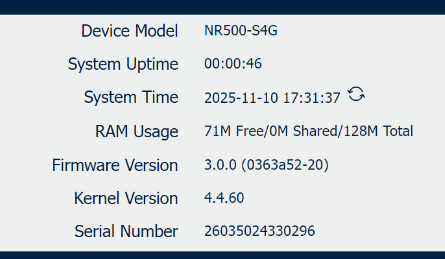 |
|
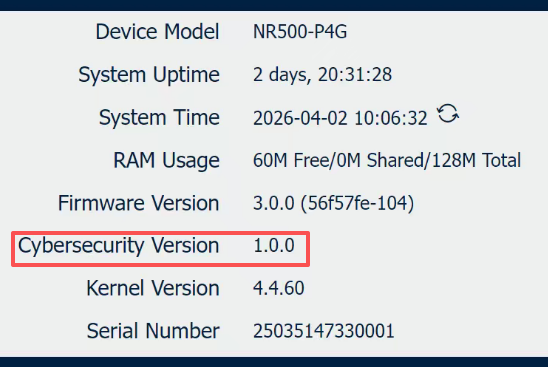
2. Critical Upgrade Policy
Please be aware of the strict version control policy regarding Secure Firmware:
⚠️Important: The upgrade path from Standard Firmware to Network Security Firmware is permanent and irreversible.
- No Downgrade Allowed: Once a device has been upgraded from a standard version to a Network Security Firmware version, downgrading back to a standard (non-compliant) firmware version is strictly prohibited.
- System Protection: The system bootloader will reject any attempt to flash an older, non-compliant firmware image to ensure the device maintains its security certification status.
Identify Hardware Version
First, it is essential to identify the hardware version of your device. The NR500 series consists of two distinct hardware versions: V1 and V2.
Please note that Version V1 stop selling since September 2024.
You can distinguish the version by checking the firmware version number on the device status page:
- 1.x.y: Indicates Hardware Version V1
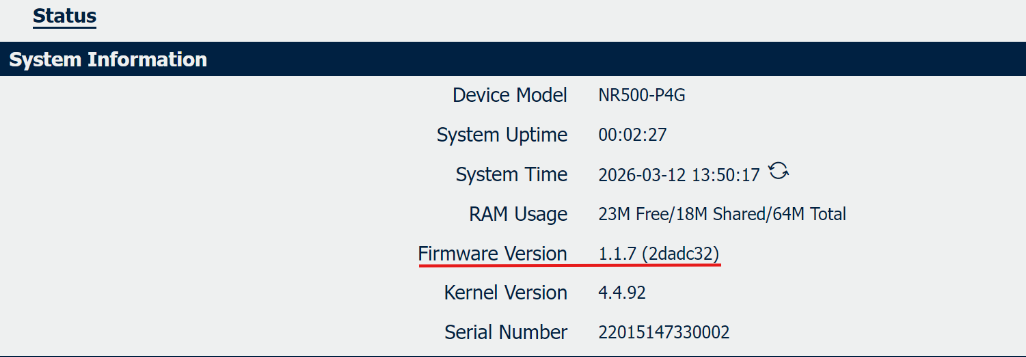
- 3.x.y: Indicates Hardware Version V2
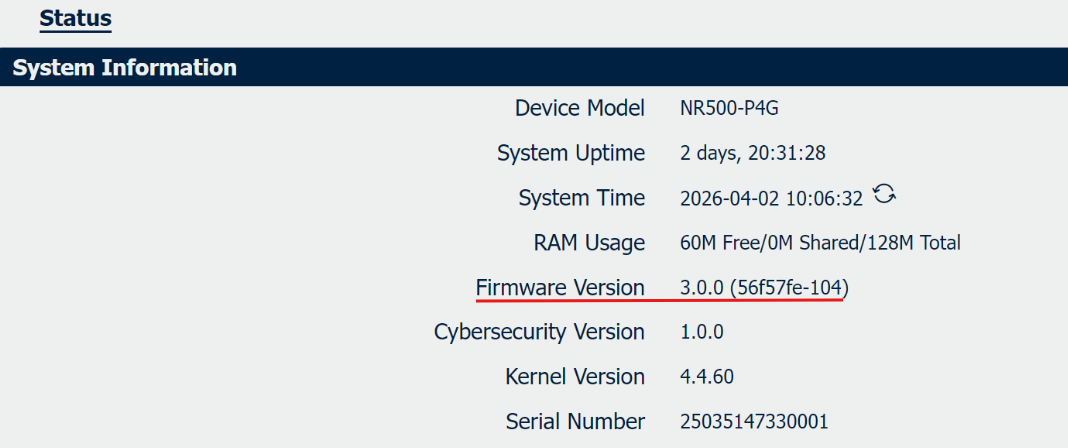
⚠️ Critical Warning:
Hardware versions V1 and V2 are completely incompatible. Firmware is not interchangeable between the two version.
Latest Firmware for V2
Applicapable for NR500-Std V2, NR500-Pro V2, NR500-NC V2
| File | Release Date | Size | Display on GUI |
| NR500 Firmware V3.0.0 | 2025/11/20 | 8.6MB | v3.0.0 (0d59d59-103) |
Changelog
New Features:
1. Add a downgrade prevention function. Not allow to downgrade to firmware versions prior to v3.0.0 (0d59d59-103).
2. Compatible with Quectel EC200A-EU Module Firmware that supported RED-DA certification.
3. Compatible with Neoway N723 Module Firmware that supported RED-DA certification.
Improved Features:
1. The number of ACL rule entries has been increased to 70.
2. Upgrade the Quectel-CM dialing process to version 1.6.5.
3. Ignore the handling of Quectel-CM session disconnections.
4. Fix the issue where the DHCP service malfunctions when the default policy of the firewall is setto DROP.
5. The basic encryption algorithms of the firmware are changed.
6. The encryption algorithms of the below APPs are changed.
| APP | Version | Compatible Firmware |
| DLMSmaster | v1.1.1(070ced9-1) | v3.0.0(79e4414-100) or newer |
| DLMSto IEC104 | v1.1.1(070ced9-1) | v3.0.0(79e4414-100) or newer |
| Modbus Master | v1.1.1(070ced9-1) | v3.0.0(79e4414-100) or newer |
Latest Firmware for V1
Applicapable for NR500-Std V1, NR500-Pro V1, NR500-NC V1
Changelog