L2TP VPN
Layer 2 Tunneling Protocol (L2TP) is a tunneling protocol used to support virtual private networks (VPNs) or as part of internet service delivery. It operates by encapsulating Layer 2 frames, such as PPP, over an IP network to create a secure tunnel between endpoints, enabling the transmission of non-IP protocols across IP-based infrastructure. This technology allows for the establishment of a point‑to‑point connection over a public network, where encapsulation and decapsulation are performed at the tunnel endpoints to maintain data integrity and session continuity

L2TP Server Status
|
Field |
Description |
|
Display the status of the L2TP Server. |
|
Display the IP of the Remote L2TP client. |
| Interface | Display the Interface name of the L2TP Server. |
|
Display the uptime of the L2TP tunnel. |
L2TP Client Status
|
Field |
Decription |
|
Display the actived status of the L2TP client connection. |
|
Display the description of the L2TP client connection. |
|
Display the status of the L2TP client connection. |
|
Display the licensing local port of the L2TP client connection. |
|
Display the port of the remote L2TP Sever. |
|
Display the Interface name of the L2TP Client. |
|
Display the uptime of the L2TP tunnel. |
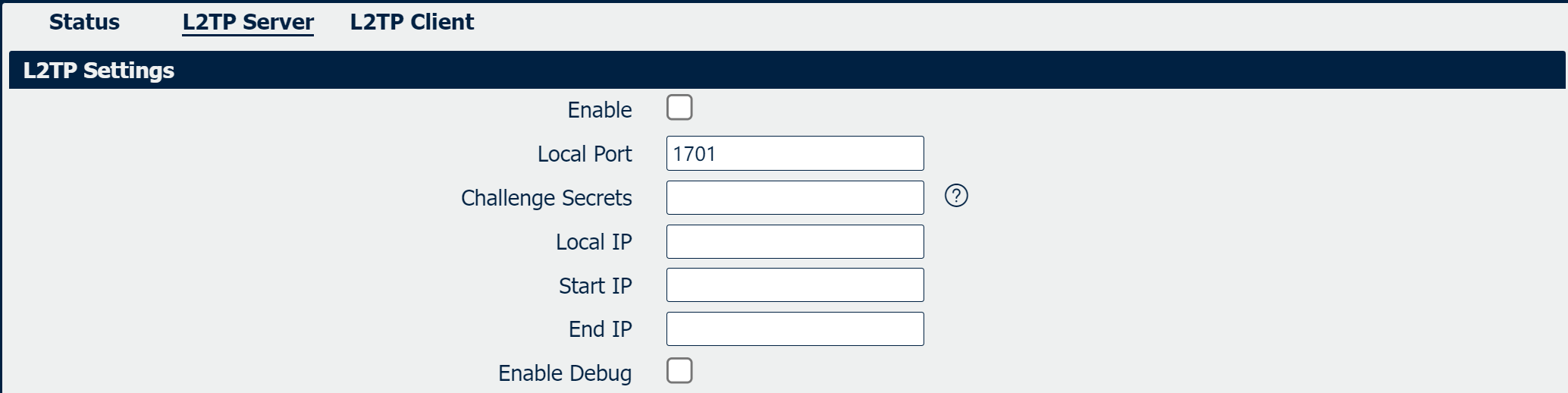
|
Field |
Description |
|
Check the option to active L2TP Service. |
|
Enter Challenge Seretes for the authentication. |
| Local IP | Specify the Local IP for L2TP Service. |
|
Specify the start IP address to be obtained for the L2TP clients. |
| End IP | Specify the end IP address to be obtained for the L2TP clients. |
|
Check the option to add the debug syslog for L2TP. |
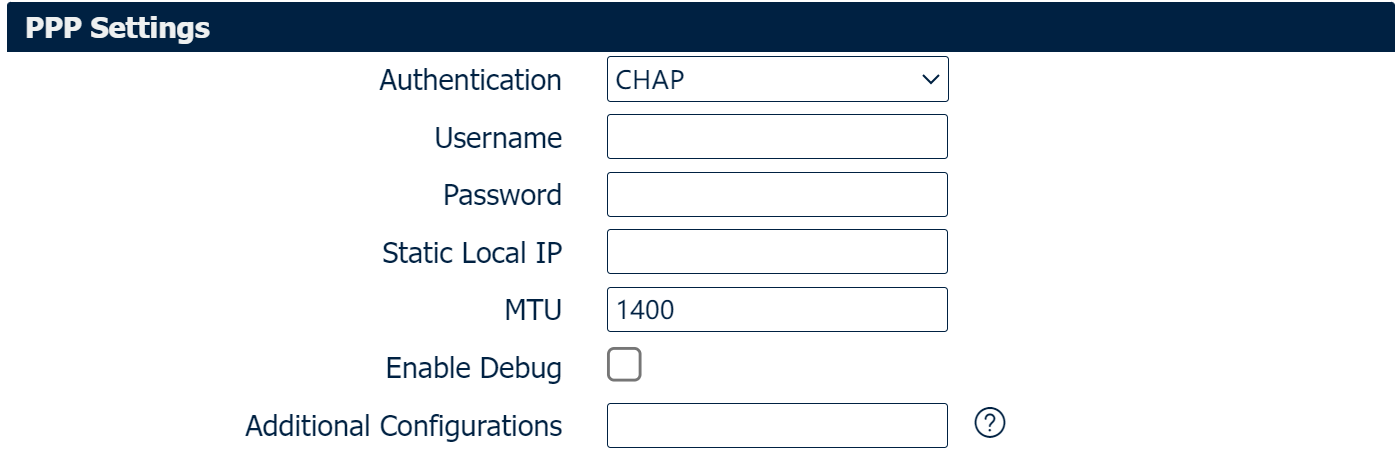
|
Field |
Description |
|
Select the authentication type, available options are “CHAP”, “PAP”, “MSCHAP_v1”, “MSCHAP_v2” and “None” |
|
Enter the username for the authentication. |
| Password | Enter the password for the authentication. |
|
Enter a static IP assigned for L2TP Server connection. If empty, the IP will be randomly assigned by L2TP server. |
| MTU | Maximum Transmission Unit, maximum packet size allowed to be transmitted for L2TP connection. Should be left as default value of 1500 in most cases. |
|
Check the option to add the debug syslog for L2TP. |
|
Enter some other PPP configuration in this field. Each expression can be separated by a ‘,’. |
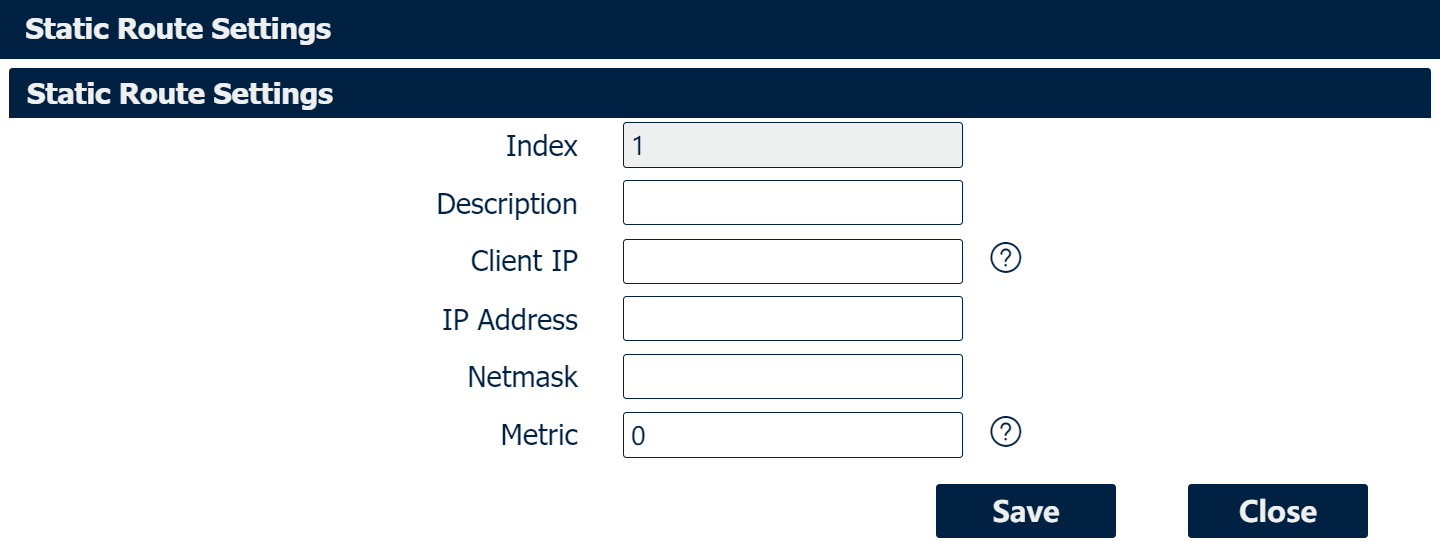
|
Field |
Description |
|
Enter the description of the static route settings. |
|
Enter the L2TP virtual IP of L2TP Client. |
| IP Address | Enter the local IP of L2TP Client device. |
| Netmask | Enter the network subnet of L2TP client device. |
|
Enter the Metric for this static route. |

|
Field |
Description |
|
Specify the interface to establish L2TP tunnel. Only specified interface turn into active WAN will start VPN tunnel. Default is null and unbound link interface. e.g. WAN, WWAN1, etc.. |
|
L2TP over IPsec is a VPN technology that operates by encapsulating the L2TP protocol within the IPsec protocol. |
| Enable NAT | Enable: The source address of the data packets flowing out from the lower host device is NAT-ed to the VPN virtual IP. |
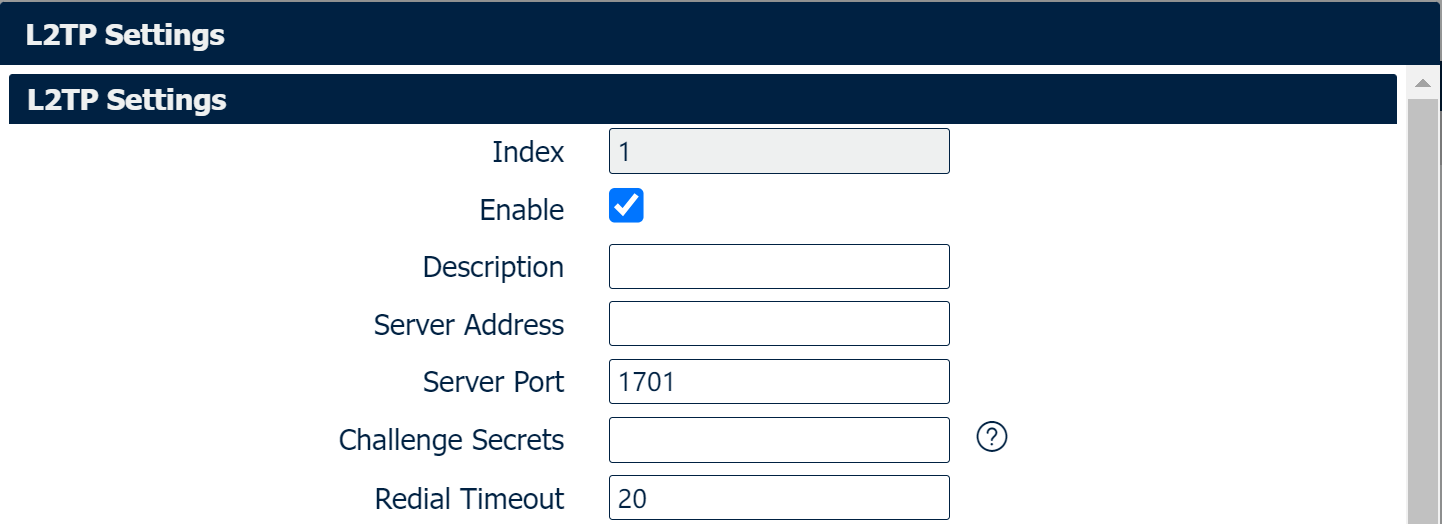
|
Field |
Description |
|
Enter the description of L2TP connection. |
|
Enter L2TP Server address. |
| Server Port | Enter the port for L2TP Server address. |
|
Enter Challenge Seretes for the authentication. |
| Redial Timeout | After the L2TP Client initiates a connection, if it fails to connect to the L2TP Server within the time set by Redial Timeout, the dialing will fail and the connection attempt will be reinitiated. |
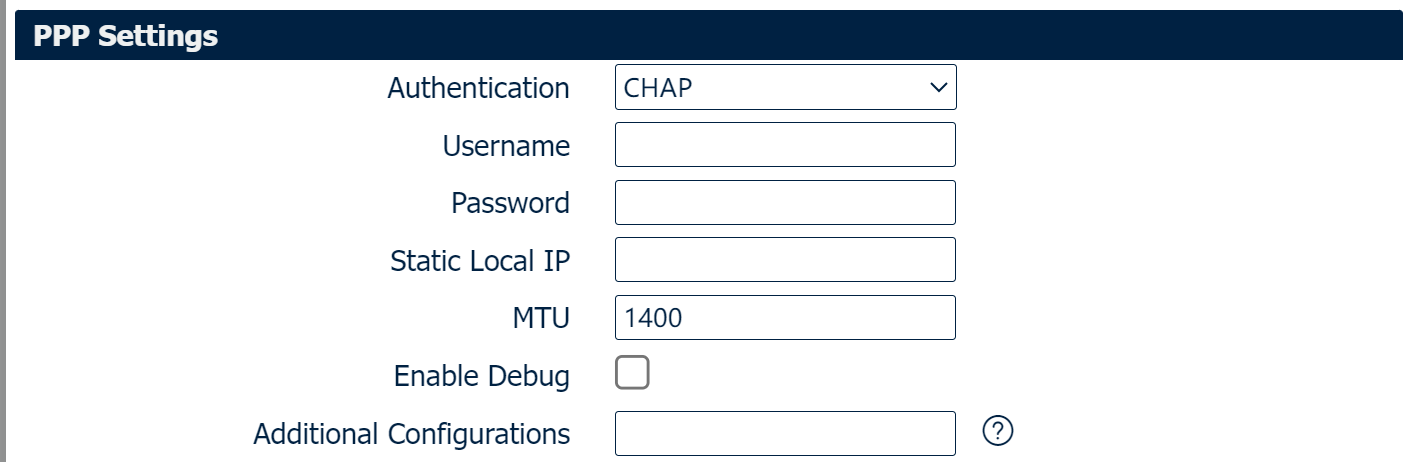
|
Field |
Description |
|
Select the authentication type, available options are “CHAP”, “PAP”, “MSCHAP_v1”, “MSCHAP_v2” and “None” |
|
Enter the username for the authentication. |
| Password | Enter the password for the authentication. |
|
Enter a static IP assigned for L2TP Server connection. If empty, the IP will be randomly assigned by L2TP server. |
| MTU | Maximum Transmission Unit, maximum packet size allowed to be transmitted for L2TP connection. Should be left as default value of 1500 in most cases. |
|
Check the option to add the debug syslog for L2TP. |
|
Enter some other PPP configuration in this field. Each expression can be separated by a ‘,’. |

|
Field |
Description |
|
Specify the interface to establish L2TP tunnel. Only specified interface turn into active WAN will start VPN tunnel. Default is null and unbound link interface. e.g. WAN, WWAN1, etc.. |
| Enable NAT | Enable: The source address of the data packets flowing out from the lower host device is NAT-ed to the VPN virtual IP. |
| Enable Default Route | Enable: The traffic will be routed out through this L2TP interface first.. |