Overview
Navigation bar function
| Notification: |
Synchronize unread notification information in the Alert menu.
|
| Help Center: |
Jump to the webpage link of Navigateworx Help center.
|
| Account information: |
including user profile picture, name, and registered email address.
|

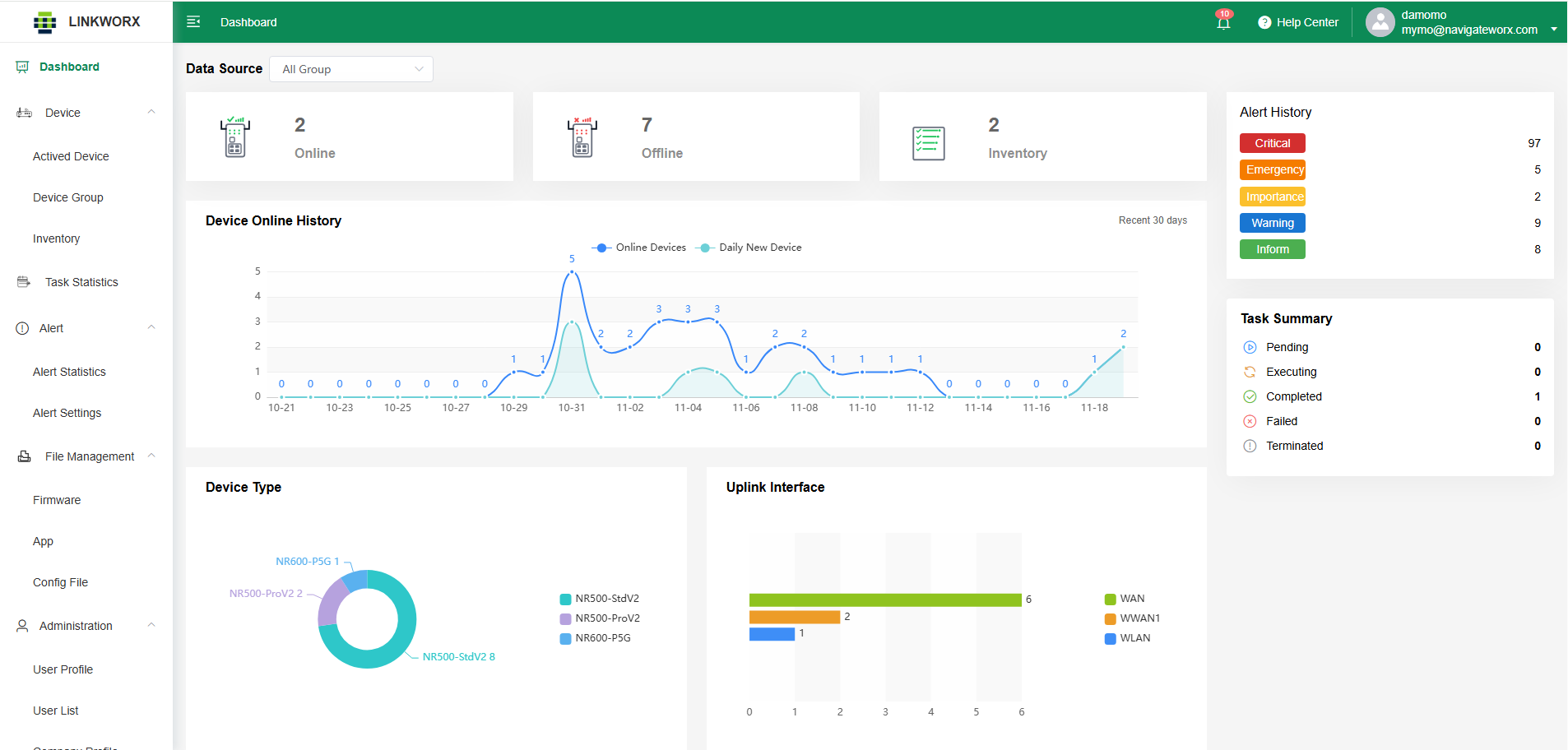
Major Componets
| Data Source: |
Statistically analyze the device status of the enterprise/organization, where 'All' represents the status of all devices, or by grouping devices.
|
| Online: |
Indicates that the device is currently connected to the platform and actively communicating. Real-time data, status, and remote operations are available when a device is online.
|
| Offline: |
Shows that the device is not connected to the platform. It may be powered off, disconnected from the network, or experiencing communication issues.
|
| Inventory: |
Refers to devices that have been added to the system but have not yet been activated or brought online. These devices are registered for future deployment, configuration, or assignment to a device group.
|
| Alert History: |
A chronological record of all alarm or event notifications generated by devices. The history includes timestamps, alert types, severity levels, and recovery logs, helping users analyze device behavior and diagnose issues.
|
| Task Summary: |
A consolidated view of all batch tasks performed on devices—such as firmware upgrades, configuration imports, or scheduled reboots. It displays the execution status, results, and logs for both completed and ongoing tasks.
|
| Device Statistics: |
Devices online history: Displays the number of devices that were online each day over the past 30 days. This helps track device connectivity trends and overall system activity. New actived devices: Shows the number of newly activated devices (move from Inventory to Actived List) each day over the past 30 days. This metric reflects deployment progress and onboarding growth.
|
| Device Type: |
Indicates the model or category of a device, such as NR500-Std, NR310, NR300, etc.
|
| Uplink Interface: |
Shows the primary network interface used by the device to access the Internet or the platform—such as Cellular (4G/5G), Ethernet WAN, or Wi-Fi WAN. It reflects the online route for data transmission and connectivity status.
|